Friday, February 4, 2011

GLOBE UNLICHAT UNLIMITED

apat my unlichat ka.Pag naubus ang 3days trial mu open xplore go to E/data/Summer0ta.conf then press 8 or edit.hanapin ang GENERAL_bilingOnStartup = 1. Then palitan ng 0 ang 1 then save go to your unlichat ayan my 3 days ulit free use. Ulit ulitin lang pag tapos ang 3 days. To download unlichat for free use your 
built in browser go to

Code:
http://unlichat.com

BSNL 3G 3.5G FREE DHAMAKA 2011 FEBRUARY HSUPA HSDPA UMTS KARNATAKA BANGALORE

Here i'm going to give free BSNL 3g trick for mobile for south india user...

Please read the whole post...

This trick is working perfactely in Karnataka, try in your state...

Here is the trick..

step1. Open default brwsr and select the apn which not open any site bsnlinternet for karnataka, bsnlmms 4 kerala, bsnlsteam 4 ap.
Minimize it


step2. Then open any other browser and conect it wt apn which gv tempory prblm eror msg ie. Bsnlwap 4 karnataka, bsnlportal 4 kerala, and bsnlwap for ap. This apn not conect the site and U get a msg that u used okb.


Step3. So then conect the browser with apn bsnlnet for all states. U get a msg that u usd 0kb. After that msg all is free

Note :
- Never disconnect access point BSNL INTERNET, BSNL MMS or BSNL STREAM.
- At the time of disconnecting first disconect BSNL NET and after that disconnect BSNL INTERNET, BSNL MMS or BSNL STREAM.
- Only 0.01 Rs. will be charged at the time of disconnecting...
- In the inbuilt web browser 'web connection time out' pop up will come but don't worry about that.

Balance condition : should not be 0 Rs..

Trick will also work in 2g phone but speed will be slow...

Enjoy...

ANDRAWING DRAWING APP FOR ANDROID WITH SOCIAL NETWORK INTEGRATION


AnDrawing is a drawing app of Android that comes with tons of drawing effects, kids drawing mode, cliparts, funny stickers, shapes, amazing drawing effects, geo location texts, facebook upload and wall posts, Flickr sharing etc.
With AnDrawing you can make a picture post on your Facebook wall, draw on your Facebook friend’s photos and share your paintings on your Facebook album. Andrawing works best with a popular social photo editor Photoid.
Features:

  • Artistic Text drawing effects with any shape
  • Draw amazing pictures and share
  • Fixed the home launcher issue
  • Play kaleidoscope!
  • Zoom/zoom your painting
  • Clip arts, effects, Stickers
  • Publish to Facebook Wall or your album
  • Add new album to the Facebook
  • Upload your pic to Flickr
  • Tag your photo with geo location text
Andrawing Pro is available in Android Market for $1.98 and the Latest version of Andrawing is 3.8.0 (for all Android versions, supports App2SD)
You can download AnDrawing  App directly from the Android Market or scan the QRcode for the link.

You can search Android Market for Andrawing.
  1. Open Android Market on Your phone
  2. Go to “Search”
  3. Type “Andrawing” in the search field and hit “Search”
  4. Once you find the “Andrawing” app, choose “Install” and follow the instructions

SHIBULAL TO BE THE INFOSYS CEO, REPLACING KRIS GOPALAKRISHNAN


Infosys Technologies to post Shibulal, its present Chief Operating Officer and one of its co-founders as the next Chief Executive Officer replacing Kris Gopalakrishnan as perreports.Infosys Technologies will get a new CEO by April as part of a regular reshuffle of the top deck.

Infosys started following the practice of changing its CEO regularly to give all the founders a shot at running the company. Kris took over from Nandan Nilekani in 2007, who in turn became CEO of Infosys when Murthy stepped down in 2002.
NR Narayana Murthy, chief mentor of Infosys, is expected to retire from the company in August this year.

HOW TO MAKE / CREATE CUSTOMIZED FLASH MOVIE ECARDS / GREETING


This is an amazing tutorial as you need not know anything about Flash. We would be using another tool, SwichMAX3 to create customized flash eCards.

Download and Install SwishMax

STEP 1: Visit this page and click on ‘DownloadSetupSwishmax3.exe’ link.
STEP 2: Once you are done with its download, install the same on your computer and run it.
STEP 3: Now, click on the button labelled as Try Now. Now you will re redirected to a webpage where you would be prompted to fill in the details. Once you are done with it, Try Now button changes intoPaste Key.
STEP 4: Now check you email ID that you have entered while filling the information as you would have got the Key. Use it and activate this program which would let you create customized flash movie ecard greetings.
That is it! Finish its installation by clickin ‘OK‘ on the ‘Congratulations! You have entered a valid key’ dialog box to continue.

Create animated Movie

The next step is to create an animation of your choice. To continue, carry out the following steps:
  • Start with a blank template
  • Navigate it to File > Import to  Stage > Image. This will let you set an image background to your animation
Swishmax - import
  • Resize the image to fit inside the frame
  • Click the Text tool from the tool box docked on the left side of the window
  • Type the text of your choice and place it on the background
  • Set the font at other value from the Properties panel on the right
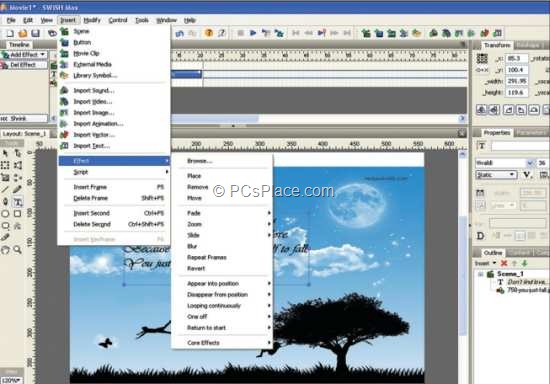
  • Select the text and Go to Insert > Effect and select an effect of your choice
Swishmax - effect
  • Finally to export the movie, go to File > Export > HTML+SWF
  • Type a name for the file the animation will be save as two files, one HTML and another an SWF file.
  • Run the HTML file to view the animation you created.

Add Sound to the Flash Movie

You can complete your movie by adding a background sound to it as well. When you are using a sound, make sure that your animation is as long as the music frames.
To do that, just break your text into smaller blocks to experiment with multiple effects. To add music to your movie, carry out the following steps:
  • Go to Insert > Import Sound
  • The song will be added to your movie. A pink strip will signify the length of your movie on the time line
  • Proceed to create your final animation
If you wish to edit the sound file, you can do so using popular applications like Sound Forge.
That is it! Just few minutes and thoughts at work, you can easily make / create customized flash movie ecard greetings. Now this is one of the best way to express your feelings, as these ecards are something that you have created from the scratch and it depicts your feelings.

HOW TO REMOVE/RESET MOBILE MEMORY CARD PASSWORD

Now a days many peoples are using the Mobile Phones.But most of them are using External Memory Chip (Memory card like MMC,microsd,e.t.c) since phone memory is not enough for them.Most of the Mobile Phones have a option to set a Password in memory chip for peoples Security and Privacy purpose.But the common mistake happening among them are forgetting their password for at least one time.If you would like to set password on your memory card,i would recommend please don't do it because if you forgotten your password you may encounter many strange problems.But don't worry if you forgotten your password since 
Mistakes are a part of being Human.Here i will give you the tutorial to Recover Memory Card password using simple method,just follow the steps given below:


1.First download and install x-plore,if you don't have x-Plore just Google it.
2.Now open the X-Plore and press Zero(0) then check you have marked the "Show the System Files".
3.After you done the above step now go to the file:///C:/Sys/Data/Mmcstore
4.If you found the above path then press the option "3" to set the Hex-Viewer.
5.Now look the third column you can see the code like ! TMSD02G (c??”?x???3?3?3?3?3) .Now see the characters between '?' because it is your password 33333.
6.You mayn't able to access the path  file:///C:/Sys/Data/Mmcstore if you don't set the password for the memory card.

LATEST WORKING IDEA FREE ISD CALLING TRICKS IN KARNATAKA


Hi friends now latest Idea free ISD call trick is back.Now you make ISD call to Dubai at just 50p/min only in Idea Network.Just type the ISD Dubai number on your mobile and just remove the first two digit of the ISD number i.e "00" and put the number "+910" instead of the number "00".


Now you can make ISD call to any nimber in Dubai at just 50p/min.
For example:
+9109xxxxxxxxxxx
This trick is successfully tested in Karnataka and it is working fine in all over Karnataka